EVALUATE (Required)
At the most basic level, a DAX query is an EVALUATE statement containing a table expression. However, a query can contain multiple EVALUATE statements.
Example:
EVALUATE(
'Internet Sales'
)
Returns all rows and columns from the Internet Sales table, as a table.

ORDER BY (Optional)
The optional ORDER BY keyword defines one or more expressions used to sort query results. Any expression that can be evaluated for each row of the result is valid.
EVALUATE(
'Internet Sales'
)
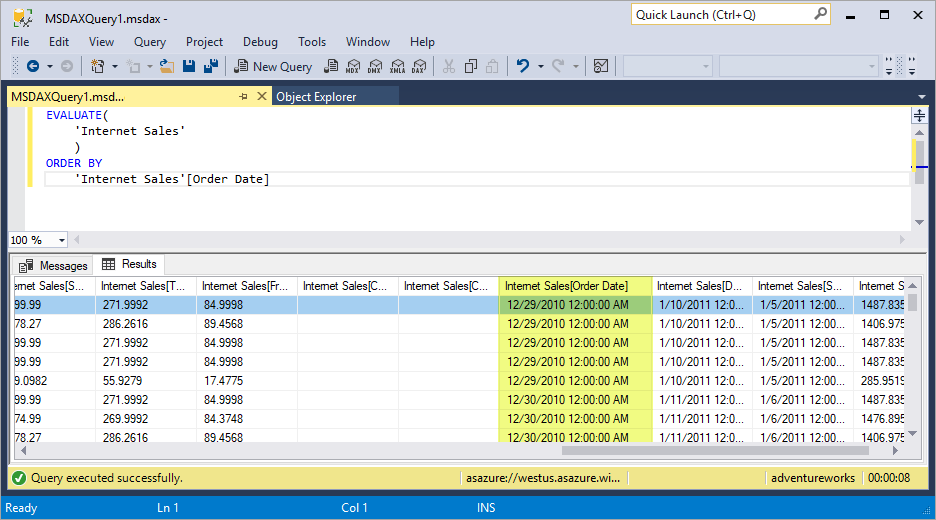
ORDER BY
'Internet Sales'[Order Date]
Returns all rows and columns from the Internet Sales table, ordered by Order Date, as a table.
START AT (Optional)
The optional START AT keyword is used inside an ORDER BY clause. It defines the value at which the query results begin.
EVALUATE(
'Internet Sales'
)
ORDER BY
'Internet Sales'[Sales Order Number]
START AT "SO7000"
Returns all rows and columns from the Internet Sales table, ordered by Sales Order Number, beginning at SO7000.

Multiple EVALUATE/ORDER BY/START AT clauses can be specified in a single query.
DEFINE (Optional)
The optional DEFINE keyword defines entities that exist only for the duration of the query. Definitions are valid for all EVALUATE statements. Entities can be variables, measures, tables, and columns. Definitions can reference other definitions that appear before or after the current definition. Definitions typically precede the EVALUATE statement.
DEFINE
MEASURE 'Internet Sales'[Internet Total Sales] = SUM('Internet Sales'[Sales Amount])
EVALUATE
SUMMARIZECOLUMNS
(
'Date'[Calendar Year],
TREATAS({2013, 2014}, 'Date'[Calendar Year]),
"Total Sales", [Internet Total Sales],
"Combined Years Total Sales", CALCULATE([Internet Total Sales], ALLSELECTED('Date'[Calendar Year]))
)
ORDER BY [Calendar Year]
Returns the calculated total sales for years 2013 and 2014, and combined calculated total sales for years 2013 and 2014, as a table. The measure in the DEFINE statement, Internet Total Sales, is used in both Total Sales and Combined Years Total Sales expressions.


No comments:
Post a Comment